


Page 49 - 2021-bfw-SPA-4e-TE-sample.indd
P. 49
130    CHAPTER 2   •  Modeling One-Variable Quantitative Data


                        TEACHING TIP                    TECH     Finding Areas from Values in a Normal Distribution
                                                        CORNER
                Consider your students’ access to
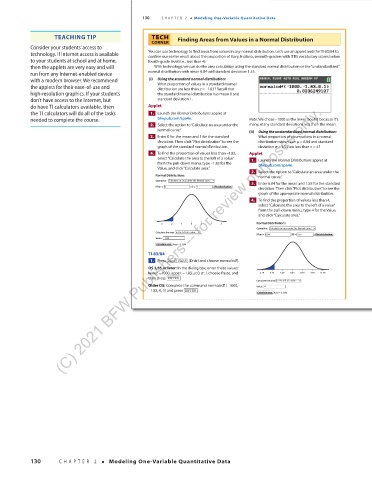
                technology. If Internet access is available   You can use technology to find areas from values in any normal distribution. Let’s use an applet and the TI-83/84 to
                                                       confirm our earlier result about the proportion of Gary, Indiana, seventh-graders with ITBS vocabulary scores below
                to your students at school and at home,   fourth-grade level (i.e., less than 4).
                then the applets are very easy and will   With technology, we can do the area calculation using the standard normal distribution or the “unstandardized”
                run from any Internet-enabled device   normal distribution with mean 6.84 and standard deviation 1.55.
                with a modern browser. We recommend     (i)  Using the standard normal distribution:
                the applets for their ease-of-use and     What proportion of values in a standard normal
                                                            distribution are less than z =−
                                                                           1.83? Recall that
                high-resolution graphics. If your students   the standard normal distribution has mean 0 and
                don’t have access to the Internet, but    standard deviation 1.
                           (C) 2021 BFW Publishers -- for review purposes only.
                do have TI calculators available, then   Applet
                the TI calculators will do all of the tasks     1.    Launch the Normal Distributions applet at
                                                                                                  −
                needed to complete the course.            bfwpub.com/spa4e.              Note: We chose  1000 as the lower bound because it’s
                                                         2.    Select the option to “Calculate an area under the   many, many standard deviations less than the mean.
                                                          normal curve.”                   (ii)  Using the unstandardized normal distribution:
                                                         3.    Enter 0 for the mean and 1 for the standard   What proportion of observations in a normal
                                                          deviation. Then click “Plot distribution” to see the     distribution with mean µ = 6.84 and standard
                                                          graph of the standard normal distribution.  deviation σ =1.55 are less than x = 4?
                                                         4.    To find the proportion of values less than  1.83−  ,    Applet
                                                          select “Calculate the area to the left of a value”     1.    Launch the Normal Distributions applet at
                                                                            −
                                                          from the pull-down menu, type  1.83 for the   bfwpub.com/spa4e.
                                                          Value, and click “Calculate area.”
                                                                                           2.    Select the option to “Calculate an area under the
                                                          Normal Distributions              normal curve.”
                                                          Operation:  Calculate an area under the Normal curve
                                                                                           3.    Enter 6.84 for the mean and 1.55 for the standard
                                                          Mean = 0   SD = 1  Plot distribution
                                                                                            deviation. Then click “Plot distribution” to see the
                                                                                            graph of the appropriate normal distribution.
                                                                                           4.    To find the proportion of values less than 4,
                                                                                            select “Calculate the area to the left of a value”
                                                                                            from the pull-down menu, type 4 for the Value,
                                                                                            and click “Calculate area.”
                                                           –3  –2  –1  0  1  2  3           Normal Distributions
                                                                                            Operation:  Calculate an area under the Normal curve
                                                          Calculate the area  to the left of a value
                                                                                            Mean = 6.84  SD = 1.55  Plot distribution
                                                          Value:  –1.83
                                                          Calculate area Area = 3.36%
                                                       TI-83/84
                                                         1.    Press  2nd   VARS  (Distr) and choose normalcdf(.
                                                       OS 2.55 or later: In the dialog box, enter these values:
                                                       lower: −1000, upper: −1.83, µ:0, σ :1, choose Paste, and   2.19  3.74  5.29  6.84  8.39  9.94  11.49
                                                       then press  ENTER .
                                                                                           Calculate the area  to the left of a value
                                                       Older OS: Complete the command normalcdf (−1000,   Value:  4
                                                       −1.83, 0, 1) and press  ENTER .
                                                                                            Calculate area Area = 3.35%


                                                  03_StarnesSPA4e_24432_ch02_088_153.indd   130                            07/09/20   1:56 PM


                130       CHAPTER 2   •   Modeling One-Variable Quantitative Data


          03_TysonTEspa4e_25177_ch02_088_153_4pp.indd   130                                                            10/11/20   7:46 PM

